
- ✔ Verified by VirusTotal
- ✔ 100% Original Product & Virus-Free
- ✔ Lifetime Free Updates on Single Purchase
- ✔ Unlimited Website Usage
- ✔ Prices in USD (Tax Included)
🔥 Limited-Time Deal — Ends Soon!
YITH WooCommerce Ajax Search Premium 2.12.0
$59.00 Original price was: $59.00.$2.99Current price is: $2.99.
Instant Access
7 Day Money Back Guarantee
Online Support 24/7
Secure Payment
Description
YITH WooCommerce Ajax Search Premium 🔍⚡
📌 This is a GPL-distributed version. No official support. Clean, secure, and legally redistributed under the GPL license.
What is YITH WooCommerce Ajax Search Premium? ❓
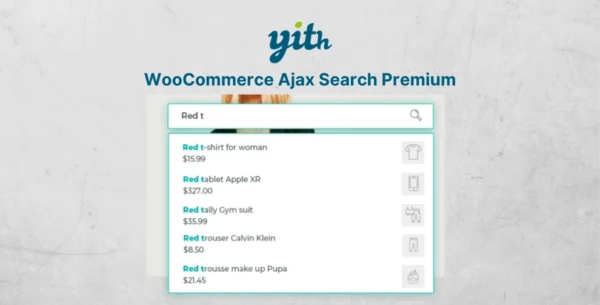
YITH WooCommerce Ajax Search Premium is a powerful, real-time search solution for your WooCommerce store. It lets customers instantly find products as they type, showing results with images, prices, categories, tags, and even SKUs—making product discovery faster, easier, and more accurate.
A slow or poor search bar can cause customers to leave your site within seconds. With Ajax Search, you eliminate this frustration, offering a professional tool that transforms casual visitors into paying customers.
Why You Need This Plugin 🚀
⏳ Reduce Bounce Rate – Show results instantly before users get frustrated.
🛍️ Increase Conversions – Help customers quickly find what they’re looking for.
🎯 Targeted Results – Search by tags, categories, SKUs, and even product content.
📱 Mobile Optimized – Works smoothly on all devices.
💡 Marketing Advantage – Highlight promotions, featured products, and discounts right inside the search results.
Free Version Features 🆓
📝 Customize input label & search button label.
🔢 Set minimum characters required for search.
📊 Define maximum number of results.
🔗 Use shortcodes and widgets to place the search bar anywhere.
Premium Version Features 🌟
All free version features, plus:
Advanced Search Capabilities 🔍
Filter by search fields.
Show list of categories (all or main categories).
Extend search to pages and posts.
Search inside product excerpts and full content.
Include categories, tags, and SKUs in search.
Support for variable products SKUs.
Option to exclude out-of-stock products. 🆕
Improved Search Results 🖼️
Show product thumbnails in search suggestions.
Display product prices.
Add discount badges and highlight featured products.
Show short product descriptions.
Fully customizable loader icon (GIF).
Vendor & Multi-Store Support 🛒
Search by vendor name (with YITH WooCommerce Multi Vendor).
Adjust search bar width to full page layout.
Benefits for Your Store 💼
✅ Enhances user experience by delivering accurate, instant results.
✅ Drives more sales by reducing cart abandonment caused by poor navigation.
✅ Transforms your search bar into a powerful sales & marketing tool.
✅ Boosts customer retention with fast, frustration-free navigation.
👉 YITH WooCommerce Ajax Search Premium is the ultimate tool to make sure your customers always find what they need—quickly, easily, and without leaving your site.
Be the first to review “YITH WooCommerce Ajax Search Premium 2.12.0” Cancel reply
How to Install
Follow these quick steps to install from a .zip file or directly from your WP dashboard.
-
1
Go to Plugins → Add New
In your WordPress dashboard, open Plugins and click Add New.
-
2
Click Upload Plugin
Press Upload Plugin → Choose File and select the downloaded
plugin-name.zip. -
3
Install & Activate
Click Install Now, then Activate. You’re done!
-
4
(Optional) Enter License / Use Shortcode
Open Plugins → Your Plugin → Settings to enter your license. Add the box on the product page with:
[plugin_info_box]
Alternative: Install from WordPress directory
Go to Plugins → Add New, search the plugin name, click Install then Activate.
Manual (FTP) method
Unzip locally → upload the folder to /wp-content/plugins/ using FTP → activate from Plugins.
-
1
Go to Appearance → Themes
Click Add New → Upload Theme.
-
2
Upload the .zip file
Select
theme-name.zip, click Install Now, then Activate. -
3
Install Required Plugins
If prompted, click Begin installing plugins and activate them.
-
4
(Optional) Import Starter Content
Use the theme’s Demo Import (if provided) to load sample pages and settings.
Manual (FTP) theme install
Unzip the theme → upload to /wp-content/themes/ → activate from Appearance → Themes.



Reviews
There are no reviews yet.